

PhotoEZ Lite: A Free WordPress Photography Plugin for Client Proofing
If you’re a photographer who’s just starting out — or you’re an established pro tired of paying monthly fees for client gallery software — you’ve probably searched for some version of “free WordPress photography plugin” and ended up wading through a sea of options.
Most are either too basic to actually use professionally, or they’re free in name only and lock the actually-useful features behind a paywall.
PhotoEZ Lite is different. It’s the free version of PhotoEZ, our complete client proofing and delivery system for photographers, available on the official EJS Tech Website (coming soon to WordPress).
No credit card. No trial period. No forced upgrade prompts every five clicks. Just a real, working photography client gallery system you can install on your WordPress site today.
In this post, I’m going to walk you through exactly what PhotoEZ Lite does, who it’s for, how to install it, and how to get the most out of it.
—
What is PhotoEZ Lite?
PhotoEZ Lite is a WordPress plugin that lets photographers create watermarked client proof galleries directly on their own WordPress website.
Clients can view the proofs, select their favorite photos, and submit those selections back to the photographer — all without needing to create an account, install an app, or use any third-party platform.
It’s designed for photographers who want a professional client experience without paying for a SaaS subscription.
Once you install the plugin, the entire workflow lives on your own website. Your galleries, your domain, your brand.
PhotoEZ Lite is a pared-down version of our full PhotoEZ Pro plugin. It includes the core proofing experience — gallery creation, watermarked proof images, client selection, and email notifications — but leaves out advanced features like final image delivery, custom branded watermarks, and WooCommerce integration. If you outgrow Lite, you can upgrade to PhotoEZ Pro for the full feature set.
—
What’s Actually Included in PhotoEZ Lite?
Here’s the honest breakdown of what you get when you install PhotoEZ Lite:
Unlimited Client Galleries
Most “free” photography plugins limit you to a small number of galleries before forcing an upgrade. PhotoEZ Lite has no gallery limit. Create as many galleries as your hosting can handle.
Automatic Watermarking
Every photo you upload to a proof gallery gets a watermark applied automatically. This protects your work from being downloaded and used before the client has paid for finals. The Lite version uses a default “PROOF” watermark — if you want to upload your own custom branded watermark, that’s a Pro feature.
Secure Token-Based Gallery Access
Your clients get a unique, secure link to access their gallery. No login required. No password to forget. Just send them the link, and they can view their proofs from any device. The link is unguessable and tied to that specific gallery, so randoms can’t stumble onto your client’s photos.
Client Photo Selection
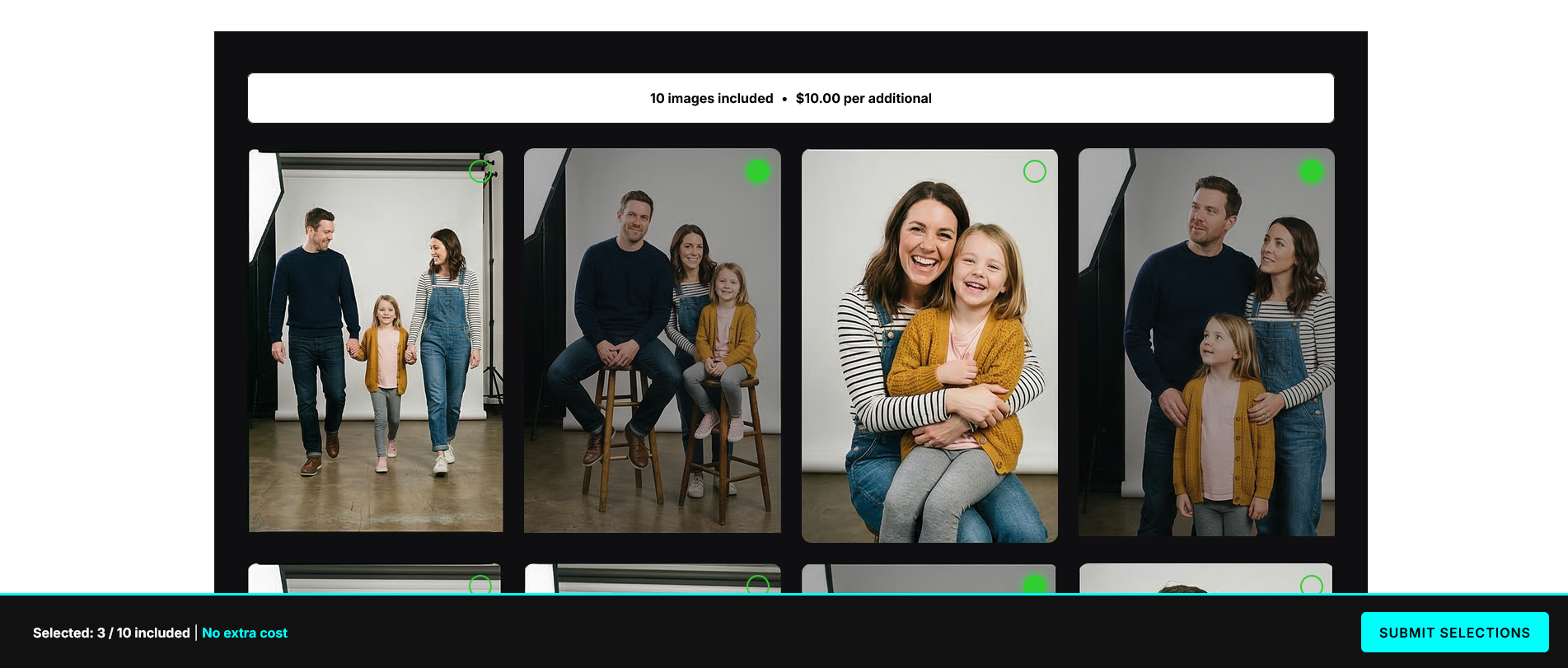
When clients open their gallery, they can click on any photo to select it as a favorite. Selected photos are visually highlighted, and a counter at the bottom of the screen shows them how many they’ve chosen. When they’re done, they click “Submit Selections” and you receive an email notification with their picks.
Email Notifications
The moment your client submits their selections, you get an email letting you know. The email includes the gallery name, client name, and which photos they chose — so you can start editing without having to log into the dashboard to check.
Admin Dashboard
PhotoEZ Lite gives you a clean dashboard inside your WordPress admin where you can see all your galleries at a glance, track which ones are pending vs. submitted, and manage everything from one place.
Mobile-Responsive Galleries
Every gallery is fully responsive. Clients can view and select photos on their phone, tablet, or desktop. Most clients these days do their proofing on mobile, so this matters more than people realize.
Lightbox Preview
Clients can click any photo to view a full-size lightbox preview before deciding whether to select it.
—
What’s NOT Included in PhotoEZ Lite (and What You’d Get with Pro)
I want to be transparent about what the free version doesn’t do. Here’s what requires upgrading to PhotoEZ Pro:
Final high-resolution image delivery via secure ZIP download. Lite handles proofing only. If you want to deliver finals through PhotoEZ, you need Pro.
Custom branded watermark. Lite uses a default proof watermark. Pro lets you upload your own logo PNG and control its position and opacity.
WooCommerce integration for selling extra photos. Pro automatically charges clients who select more photos than their package includes.
Cloud import from Dropbox, Google Drive, and Amazon S3. Pro lets you import images directly from cloud storage without downloading them first.
Twilio SMS notifications. Pro can send SMS alerts to you and your clients.
Built-in SMTP email configuration. Pro lets you configure your own email server for reliable delivery.
Booking and Contracts addons. Both addons require Pro to function.
If your business needs any of those features, you’ll want Pro. If you’re just looking for a clean way to send proof galleries to clients and collect their selections, Lite is genuinely all you need.
—
Who Is PhotoEZ Lite For?
PhotoEZ Lite is a great fit if you’re:
A photographer just starting out. You’re not booking 50 sessions a year yet. You don’t need every bell and whistle. You just need a professional way to send proofs to clients without it looking like you’re emailing them a Google Drive folder.
A photographer testing the waters. You’ve heard about PhotoEZ but you’re not ready to invest in Pro yet. Lite lets you try the entire client experience — both the admin side and the client-facing gallery — before deciding if you want to upgrade.
A photographer with a side hustle. You shoot occasionally, you have a few clients a year, and a SaaS subscription doesn’t make sense for your volume. Lite handles the basics without monthly fees.
A photographer who delivers finals another way. You use Dropbox or WeTransfer or smugmug for final delivery, but you need a polished proofing experience. Lite handles the proofing piece beautifully.
A photographer who wants to keep things on their own site. Your photography business has its own WordPress website, and you want everything to live there — including your client galleries.
—
Why Choose a WordPress Plugin Over a SaaS Platform?
The big SaaS platforms like Pixieset, Pic-Time, and ShootProof are great products, but they all share some common downsides:
You don’t own your data. Your client galleries live on someone else’s servers. If you stop paying, you lose access.
You’re locked into their pricing. When they raise prices (and they do), you have no choice but to pay or migrate everything elsewhere.
Your galleries live on their domain. Your client gets sent to yourstudio.pixieset.com, not yourstudio.com. It’s a small thing, but it matters for branding.
They take a commission on sales. Most SaaS gallery platforms charge a percentage on top of your monthly fee when clients buy extras.
PhotoEZ Lite avoids all of those problems by living on your own WordPress site. It’s just code you install, and you own the result. No subscription. No commission. No external platform.
—
How to Install PhotoEZ Lite
Installing PhotoEZ Lite is the same as installing any WordPress plugin. Here are the steps:
Log into your WordPress admin
Go to Plugins → Add New
Search for “PhotoEZ Lite”
Click Install Now, then Activate
You’ll see a new “PhotoEZ” menu in your WordPress sidebar
Click PhotoEZ → Settings and fill in your studio name and email
Click PhotoEZ → Galleries → Add New to create your first gallery
That’s it. There’s no account to create, no API key to configure, no third-party login. Once it’s installed and activated, you’re ready to go.
—
How to Create Your First Gallery
Once the plugin is installed, here’s the workflow for creating a client gallery:
Click PhotoEZ → Galleries → Add New
Give your gallery a title (usually the client’s name or session date)
Enter the client’s email address
Set the number of photos included in their package (this controls the selection counter on the client side)
Upload your proof images using the standard WordPress media uploader — PhotoEZ will automatically watermark them
Click Publish
Copy the unique gallery link from the gallery edit screen
Email the link to your client
When the client opens the link, they’ll see a beautiful proof gallery with watermarks applied. They can click photos to select their favorites. When they hit Submit, you get an email with their choices.
—
Tips for Getting the Most Out of PhotoEZ Lite
Optimize your images before uploading. Even though PhotoEZ generates watermarked proofs automatically, uploading 50 MB raw files will eat through your hosting space fast. Resize your proofs to around 1500-2000 pixels on the long edge before uploading.
Use descriptive gallery titles. “Smith Wedding 2026” is much better than “Gallery 47” when you have a dozen active galleries.
Test the client experience yourself. Before sending the first link to a real client, send it to yourself first. Make sure everything looks the way you want.
Consider the mobile experience. Most clients will view galleries on their phone. Take a moment to view your test gallery on a mobile device before going live.
Set clear expectations with clients. Tell them how many selections their package includes, when you’ll deliver the final images, and how to contact you if they have questions.
—
When to Upgrade to PhotoEZ Pro
Most photographers eventually outgrow the Lite version. Here are the signs it’s time to upgrade:
You want to deliver final images through PhotoEZ instead of Dropbox or WeTransfer. Pro’s ZIP delivery system is fast, secure, and looks professional.
You want to charge for extra photo selections. Pro’s WooCommerce integration handles upsells automatically.
You want to add online booking or contract signing. Both addons require Pro.
You want a custom branded watermark instead of the default.
You want to import directly from cloud storage like Dropbox or Google Drive.
If any of those describe you, Pro is worth the one-time investment.
—
Get Started Today
PhotoEZ Lite is completely free, and you can download it from ejstech.net or install it directly from your WordPress admin. There’s no signup, no credit card, and no expiration.
If you want to learn more about what PhotoEZ can do, or compare Lite vs Pro side by side, visit ejstech.net for the full feature breakdown.
The photography business is hard enough without paying $40 a month for software. Try PhotoEZ Lite, see how it fits into your workflow, and let me know what you think.
If you’re a photographer who’s just starting out — or you’re an established pro tired of paying monthly fees for client gallery software — you’ve probably searched for some version of “free WordPress photography plugin” and ended up wading through a sea of options.
Most are either too basic to actually use professionally, or they’re free in name only and lock the actually-useful features behind a paywall.
PhotoEZ Lite is different. It’s the free version of PhotoEZ, our complete client proofing and delivery system for photographers, available on the official EJS Tech Website (coming soon to WordPress).
No credit card. No trial period. No forced upgrade prompts every five clicks. Just a real, working photography client gallery system you can install on your WordPress site today.
In this post, I’m going to walk you through exactly what PhotoEZ Lite does, who it’s for, how to install it, and how to get the most out of it.
—
What is PhotoEZ Lite?
PhotoEZ Lite is a WordPress plugin that lets photographers create watermarked client proof galleries directly on their own WordPress website.
Clients can view the proofs, select their favorite photos, and submit those selections back to the photographer — all without needing to create an account, install an app, or use any third-party platform.
It’s designed for photographers who want a professional client experience without paying for a SaaS subscription.
Once you install the plugin, the entire workflow lives on your own website. Your galleries, your domain, your brand.
PhotoEZ Lite is a pared-down version of our full PhotoEZ Pro plugin. It includes the core proofing experience — gallery creation, watermarked proof images, client selection, and email notifications — but leaves out advanced features like final image delivery, custom branded watermarks, and WooCommerce integration. If you outgrow Lite, you can upgrade to PhotoEZ Pro for the full feature set.
—
What’s Actually Included in PhotoEZ Lite?
Here’s the honest breakdown of what you get when you install PhotoEZ Lite:
Unlimited Client Galleries
Most “free” photography plugins limit you to a small number of galleries before forcing an upgrade. PhotoEZ Lite has no gallery limit. Create as many galleries as your hosting can handle.
Automatic Watermarking
Every photo you upload to a proof gallery gets a watermark applied automatically. This protects your work from being downloaded and used before the client has paid for finals. The Lite version uses a default “PROOF” watermark — if you want to upload your own custom branded watermark, that’s a Pro feature.
Secure Token-Based Gallery Access
Your clients get a unique, secure link to access their gallery. No login required. No password to forget. Just send them the link, and they can view their proofs from any device. The link is unguessable and tied to that specific gallery, so randoms can’t stumble onto your client’s photos.
Client Photo Selection
When clients open their gallery, they can click on any photo to select it as a favorite. Selected photos are visually highlighted, and a counter at the bottom of the screen shows them how many they’ve chosen. When they’re done, they click “Submit Selections” and you receive an email notification with their picks.
Email Notifications
The moment your client submits their selections, you get an email letting you know. The email includes the gallery name, client name, and which photos they chose — so you can start editing without having to log into the dashboard to check.
Admin Dashboard
PhotoEZ Lite gives you a clean dashboard inside your WordPress admin where you can see all your galleries at a glance, track which ones are pending vs. submitted, and manage everything from one place.
Mobile-Responsive Galleries
Every gallery is fully responsive. Clients can view and select photos on their phone, tablet, or desktop. Most clients these days do their proofing on mobile, so this matters more than people realize.
Lightbox Preview
Clients can click any photo to view a full-size lightbox preview before deciding whether to select it.
—
What’s NOT Included in PhotoEZ Lite (and What You’d Get with Pro)
I want to be transparent about what the free version doesn’t do. Here’s what requires upgrading to PhotoEZ Pro:
Final high-resolution image delivery via secure ZIP download. Lite handles proofing only. If you want to deliver finals through PhotoEZ, you need Pro.
Custom branded watermark. Lite uses a default proof watermark. Pro lets you upload your own logo PNG and control its position and opacity.
WooCommerce integration for selling extra photos. Pro automatically charges clients who select more photos than their package includes.
Cloud import from Dropbox, Google Drive, and Amazon S3. Pro lets you import images directly from cloud storage without downloading them first.
Twilio SMS notifications. Pro can send SMS alerts to you and your clients.
Built-in SMTP email configuration. Pro lets you configure your own email server for reliable delivery.
Booking and Contracts addons. Both addons require Pro to function.
If your business needs any of those features, you’ll want Pro. If you’re just looking for a clean way to send proof galleries to clients and collect their selections, Lite is genuinely all you need.
—
Who Is PhotoEZ Lite For?
PhotoEZ Lite is a great fit if you’re:
A photographer just starting out. You’re not booking 50 sessions a year yet. You don’t need every bell and whistle. You just need a professional way to send proofs to clients without it looking like you’re emailing them a Google Drive folder.
A photographer testing the waters. You’ve heard about PhotoEZ but you’re not ready to invest in Pro yet. Lite lets you try the entire client experience — both the admin side and the client-facing gallery — before deciding if you want to upgrade.
A photographer with a side hustle. You shoot occasionally, you have a few clients a year, and a SaaS subscription doesn’t make sense for your volume. Lite handles the basics without monthly fees.
A photographer who delivers finals another way. You use Dropbox or WeTransfer or smugmug for final delivery, but you need a polished proofing experience. Lite handles the proofing piece beautifully.
A photographer who wants to keep things on their own site. Your photography business has its own WordPress website, and you want everything to live there — including your client galleries.
—
Why Choose a WordPress Plugin Over a SaaS Platform?
The big SaaS platforms like Pixieset, Pic-Time, and ShootProof are great products, but they all share some common downsides:
You don’t own your data. Your client galleries live on someone else’s servers. If you stop paying, you lose access.
You’re locked into their pricing. When they raise prices (and they do), you have no choice but to pay or migrate everything elsewhere.
Your galleries live on their domain. Your client gets sent to yourstudio.pixieset.com, not yourstudio.com. It’s a small thing, but it matters for branding.
They take a commission on sales. Most SaaS gallery platforms charge a percentage on top of your monthly fee when clients buy extras.
PhotoEZ Lite avoids all of those problems by living on your own WordPress site. It’s just code you install, and you own the result. No subscription. No commission. No external platform.
—
How to Install PhotoEZ Lite
Installing PhotoEZ Lite is the same as installing any WordPress plugin. Here are the steps:
Log into your WordPress admin
Go to Plugins → Add New
Search for “PhotoEZ Lite”
Click Install Now, then Activate
You’ll see a new “PhotoEZ” menu in your WordPress sidebar
Click PhotoEZ → Settings and fill in your studio name and email
Click PhotoEZ → Galleries → Add New to create your first gallery
That’s it. There’s no account to create, no API key to configure, no third-party login. Once it’s installed and activated, you’re ready to go.
—
How to Create Your First Gallery
Once the plugin is installed, here’s the workflow for creating a client gallery:
Click PhotoEZ → Galleries → Add New
Give your gallery a title (usually the client’s name or session date)
Enter the client’s email address
Set the number of photos included in their package (this controls the selection counter on the client side)
Upload your proof images using the standard WordPress media uploader — PhotoEZ will automatically watermark them
Click Publish
Copy the unique gallery link from the gallery edit screen
Email the link to your client
When the client opens the link, they’ll see a beautiful proof gallery with watermarks applied. They can click photos to select their favorites. When they hit Submit, you get an email with their choices.
—
Tips for Getting the Most Out of PhotoEZ Lite
Optimize your images before uploading. Even though PhotoEZ generates watermarked proofs automatically, uploading 50 MB raw files will eat through your hosting space fast. Resize your proofs to around 1500-2000 pixels on the long edge before uploading.
Use descriptive gallery titles. “Smith Wedding 2026” is much better than “Gallery 47” when you have a dozen active galleries.
Test the client experience yourself. Before sending the first link to a real client, send it to yourself first. Make sure everything looks the way you want.
Consider the mobile experience. Most clients will view galleries on their phone. Take a moment to view your test gallery on a mobile device before going live.
Set clear expectations with clients. Tell them how many selections their package includes, when you’ll deliver the final images, and how to contact you if they have questions.
—
When to Upgrade to PhotoEZ Pro
Most photographers eventually outgrow the Lite version. Here are the signs it’s time to upgrade:
You want to deliver final images through PhotoEZ instead of Dropbox or WeTransfer. Pro’s ZIP delivery system is fast, secure, and looks professional.
You want to charge for extra photo selections. Pro’s WooCommerce integration handles upsells automatically.
You want to add online booking or contract signing. Both addons require Pro.
You want a custom branded watermark instead of the default.
You want to import directly from cloud storage like Dropbox or Google Drive.
If any of those describe you, Pro is worth the one-time investment.
—
Get Started Today
PhotoEZ Lite is completely free, and you can download it from ejstech.net or install it directly from your WordPress admin. There’s no signup, no credit card, and no expiration.
If you want to learn more about what PhotoEZ can do, or compare Lite vs Pro side by side, visit ejstech.net for the full feature breakdown.
The photography business is hard enough without paying $40 a month for software. Try PhotoEZ Lite, see how it fits into your workflow, and let me know what you think.