
The Best WordPress Booking Plugin for Photographers in 2026
The Best WordPress Booking Plugin for Photographers in 2026
If you’re a photographer running your business on WordPress, you’ve probably realized that a generic booking plugin doesn’t quite cut it.
Most WordPress booking plugins are designed for hair salons, doctors, or fitness instructors. They handle the basic “pick a time slot” workflow well, but they miss the things photographers actually need — like deposit-based bookings, session-specific custom fields, automatic gallery creation, contract signing, and client reschedule policies that match the realities of running a photography studio.
In this post, I’m going to walk through what makes a great booking plugin specifically for photographers, compare some of the popular options, and explain why the PhotoEZ Booking Addon has become the go-to choice for photographers who want a complete booking-to-delivery workflow inside WordPress.
—
What Photographers Actually Need from a Booking System:
Before we get into specific plugins, let’s be honest about what photographers really need. If you’ve ever tried to bend a generic booking plugin to fit your workflow, you know the pain points:
1. Deposit and balance handling. Photographers don’t usually charge the full amount upfront. You need a system that lets clients pay a deposit (often 50%) at booking and the remaining balance later — automatically.
2. Session-specific pricing. A maternity session, a wedding, and a mini-session aren’t priced the same way. You need to be able to define different session types with different prices, durations, and deposits.
3. Photographer assignment. If you have associate photographers, you need to assign specific photographers to specific bookings, and only show their availability when clients book with them.
4. Custom intake fields. A wedding booking needs different information than a headshot session. Custom fields per session type aren’t a nice-to-have — they’re essential.
5. Cancellation and reschedule policies. Photographers can’t be at the mercy of last-minute cancellations. You need configurable policies, deposit credit systems, and reschedule limits.
6. Inspiration photos. Clients often want to share reference images so the photographer knows the look they’re going for. Letting them upload these at booking is a small detail that improves every shoot.
7. Integration with the rest of the workflow. Most importantly, the booking system shouldn’t be its own island. It needs to connect to contracts, gallery creation, and final delivery so the photographer’s job gets easier, not harder.
That last point is the deal-breaker for most generic booking plugins. They handle the booking, sure — but then you’re left manually creating a gallery, manually generating a contract, manually sending a balance invoice, and manually keeping track of everything in spreadsheets.
—
The Generic WordPress Booking Plugins (and Why They Fall Short)
Let’s quickly cover the popular options most photographers consider before realizing they don’t quite fit.
Amelia
Amelia is one of the most polished WordPress booking plugins on the market. It has beautiful design, supports services and packages, and integrates with WooCommerce. The free version is limited; the Pro version starts around $79/year.
Where it falls short for photographers: No inspiration photo upload at booking, no automatic gallery creation, no contract signing. You’d need to bolt on multiple other plugins to fill the gaps.
Bookly
Bookly is a workhorse booking plugin that’s been around for years. It’s flexible and supports a huge number of features through addons.
Where it falls short: The “addon” model means you’re stacking up costs ($79 for Bookly Pro + addons can quickly hit $300+). Like Amelia, it’s built for service providers in general, not photographers specifically. No native integration with photography workflows.
BookingPress
A newer entry that competes with Amelia and Bookly. Modern interface, good free tier, paid plans starting around $49/year.
Where it falls short: Same fundamental issue — generic service booking, no deposit handling, no photography-specific features.
Simply Schedule Appointments
Lightweight, easy to use, popular for solo professionals.
Where it falls short: Best for simple “pick a time and pay” use cases. Not designed for photographer workflows.
WooCommerce Bookings
The official WooCommerce extension. $249/year and it works, but it’s barebones.
Where it falls short: Setup is complex, the booking form is plain, and you still don’t get any photography-specific features.
The pattern is clear: every generic booking plugin handles the booking part. But the moment you need photography-specific features like deposits, contracts, and gallery creation, you hit a wall.
—
PhotoEZ Booking Addon: Built Specifically for Photographers
The PhotoEZ Booking Addon is part of the PhotoEZ ecosystem — a suite of WordPress plugins designed specifically for photographers running their entire business inside WordPress.
It connects directly to PhotoEZ for galleries and the optional PhotoEZ Contracts Addon for digital contract signing.
This isn’t a generic booking plugin with photography branding slapped on. Every feature was designed around how photographers actually work.
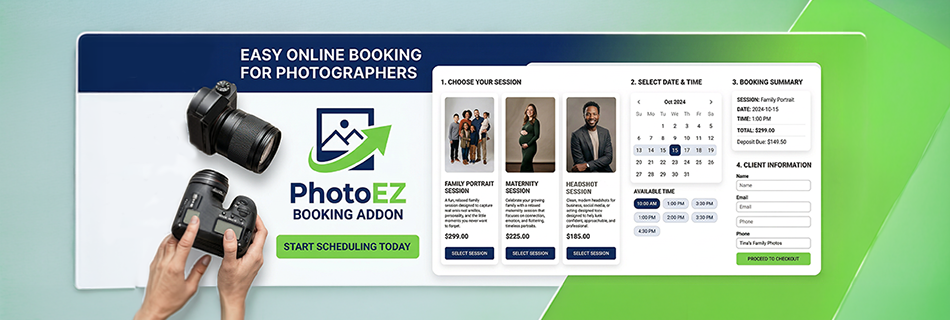
Embeddable Booking Form
Add the PhotoEZ shortcode to any page on your WordPress site, and clients can immediately start the booking process.
The form walks them through choosing a session type, selecting a photographer, picking a date and time, and providing their information.
Deposit or Pay-in-Full Checkout
This is the killer feature. At checkout, clients see clearly:
The full session price
The deposit amount required to book
The remaining balance due
They can choose to pay just the deposit or pay the full amount upfront. The checkout uses WooCommerce, which means you keep 100% of revenue minus standard payment processor fees.
Automatic Balance Invoicing
Three days before the session, the plugin automatically emails the client an invoice for the remaining balance. One day before the session, if the balance hasn’t been paid yet, it sends a reminder. No manual chasing required.
Photographer Management
If you work alone, this is a non-issue. If you have associate photographers, you can add unlimited photographers to the system, each with their own availability schedule, blackout dates, and minimum booking notice. Assign specific session types to specific photographers.
Session Types with Custom Fields
Create unlimited session types — Family, Maternity, Headshots, Weddings, Mini Sessions, whatever your business offers. Each session type has its own price, deposit, duration, and custom fields. Need to ask wedding clients about their venue? Add a custom field. Need to ask headshot clients about their company? Add another custom field.
Real-Time Availability
The booking form only shows time slots that are actually open. Buffer time between sessions prevents back-to-back conflicts. Blackout dates (vacations, holidays, dates you’re unavailable) hide automatically.
Inspiration Photo Upload
Optionally allow (or require) clients to upload inspiration photos at booking. The photos are included in the booking confirmation email to the photographer, so by the time you arrive at the shoot, you already know the vision.
Cancellation Policy Engine
Configure your cancellation policy in the settings:
Cancellation window (default 48 hours)
Whether deposits are refundable, non-refundable, or convert to session credit
Maximum number of reschedules per booking
Minimum notice required for rescheduling
The system enforces all of this automatically.
Session Credits
When a client cancels under your policy, their deposit can automatically convert to a session credit they can use for a future booking. Credits have configurable expiry (default 12 months) and apply at checkout to reduce their next deposit or balance.
SMS Notifications via Twilio
Connect your Twilio account and the plugin can send SMS confirmations, booking notifications to photographers, and 24-hour session reminders to clients. SMS opt-in is a checkbox at booking, so you only message clients who consent.
Google Calendar Integration
After booking, clients see an “Add to Google Calendar” button on the thank-you page. The same link is in their confirmation email. Session name, date, time, duration, and location are all pre-filled.
Client Self-Service
Two shortcodes give clients self-service tools:
The PhotoEZ manage booking shortcode lets them look up their booking by email and ID, and the PhotoEZ Cancel Booking Shortcode provides a token-based cancellation flow
No login required. No support tickets for simple changes.
Automatic Gallery Creation
This is where the integration with the rest of PhotoEZ shines. The moment a booking payment completes, PhotoEZ automatically creates a linked gallery for that session — pre-filled with the client’s name, email, session date, and assigned photographer. Your gallery is ready and waiting in your PhotoEZ dashboard before you even pick up your camera.
Automatic Contract Signing (with Contracts Addon)
If you also use the PhotoEZ Contracts Addon, clients are automatically redirected to sign their contract immediately after payment. The signed contract is stored, emailed to both parties, and accessible to the client at any time. No separate email. No chasing signatures.
—
How PhotoEZ Booking Compares to Generic Plugins:
| Feature | Generic Booking Plugins | PhotoEZ Booking |
|---|---|---|
| Deposit-based booking | Limited or absent | ✅ Built-in |
| Pay-in-full option | Sometimes | ✅ Client choice |
| Auto balance invoicing | No | ✅ Automatic |
| Photographer management | Basic | ✅ Full per-photographer settings |
| Session-specific fields | Limited | ✅ Unlimited custom fields per session type |
| Inspiration photo upload | No | ✅ Built-in |
| Cancellation policy engine | Basic | ✅ Full policy with credits |
| Reschedule limits | Sometimes | ✅ Configurable |
| Session credit system | No | ✅ Built-in |
| SMS reminders | Add-on | ✅ Built-in (Twilio) |
| Auto gallery creation | No | ✅ Native integration |
| Auto contract signing | No | ✅ Native integration |
| Cost | Subscription-based | ✅ One-time purchase |
The difference isn’t just features — it’s that the entire system was designed for photographers from the ground up.
—
Setting Up PhotoEZ Booking on Your WordPress Site
Setting up PhotoEZ Booking takes about an hour from a fresh install.
Here’s the rough workflow:
Step 1: Install PhotoEZ and the Booking Addon
You’ll need PhotoEZ (or PhotoEZ Pro) installed first, since the Booking Addon extends it. WooCommerce also needs to be active, since payments flow through WooCommerce.
Step 2: Configure Your Cancellation and Reschedule Policies
Go to PhotoEZ → Booking Settings. Set your cancellation window, decide whether deposits are refundable or convert to credits, and configure your reschedule limits.
Step 3: Add Your Photographers
If you work alone, add yourself as the only photographer. If you have associates, add each one. Set their availability by day of week, their blackout dates, and their minimum booking notice.
Step 4: Create Your Session Types
Go to PhotoEZ → Session Types and add each session you offer. Set the price, deposit, duration, and any custom intake fields. Assign which photographers can be booked for that session.
Step 5: Configure Email and (Optional) SMS
Set up your studio email address, customize your confirmation email template, and (if using SMS) connect your Twilio account.
Step 6: Create Your Booking Page
Add a new WordPress page called “Book a Session,” paste in the photoez booking shortcode, and publish.
Step 7: Add Manage and Cancel Pages
Create two more pages with shortcodes for client self-service.
Step 8: Test the Full Flow
Before sending real clients, do a complete test booking yourself. Pay the deposit, walk through the confirmation email, try the manage and cancel flows. Make sure the gallery is auto-created in PhotoEZ.
—
Who Should Choose PhotoEZ Booking?
PhotoEZ Booking is the right choice if:
You’re a photographer who already uses WordPress (or is willing to)
You want booking, contracts, galleries, and delivery in one connected system
You want to charge deposits without manual processing
You want to keep 100% of your revenue (no SaaS commissions)
You want a one-time purchase instead of an ongoing subscription
You have associate photographers and need per-photographer scheduling
Who shouldn’t choose PhotoEZ Booking?
Photographers who don’t want to use WordPress, photographers whose workflow is so simple a basic Calendly link is enough, and photographers who genuinely value SaaS convenience over ownership.
—
Get Started
The PhotoEZ Booking Addon requires the main PhotoEZ Pro plugin to function. The fastest way to evaluate the system is to start with the free PhotoEZ Lite on WordPress.org, see how the gallery experience works, and then upgrade to Pro to add booking and contracts.
For full details and pricing, you can also visit ejstech.net.
—
The Bottom Line
Generic WordPress booking plugins are built for generic businesses. Photography is not a generic business. You need deposits. You need photographer scheduling. You need custom fields. You need automatic gallery creation. You need contract signing. You need it all to work together without a stack of plugins held together by duct tape.
PhotoEZ Booking is the booking plugin that was actually designed for how photographers work. If you’re tired of bending a generic tool to fit your workflow, give it a try. Your future self will thank you when your next booking automatically creates a gallery, sends a contract, and reminds the client about their balance — all without you lifting a finger.