
Why I Built PhotoEZ: A Photographer’s Workflow, Built for Photographers
Why I Built PhotoEZ: A Photographer's Workflow, Built for Photographers
Why I Built PhotoEZ: After 17 Frustrating Years as a photographer
There’s no shortage of WordPress plugins for photographers. Galleries, booking tools, contract systems, proofing apps, payment plugins, download managers — you can find a plugin for almost any single piece of a photography business. There are even a few platforms that try to bundle several of these together, usually for a monthly fee.
What I couldn’t find was anything that understood the whole workflow. So I built it myself. That became PhotoEZ — and this is the story of why I built PhotoEZ: a photographer’s workflow, built by a photographer, not a software company. You can see the full feature set on the EJS Tech homepage.
I’ve been a working photographer for more than 17 years, running Elle Jones Studios the whole time, and PhotoEZ grew directly out of that experience. Every workflow decision in the plugin has been tested against my own client sessions first.
It Started With Photography, Not Software
I didn’t set out to build “another gallery plugin.” The idea came from a much more annoying, everyday question: why is it this hard to manage a client’s entire experience from one place? That question is really the short answer to why I built PhotoEZ in the first place.
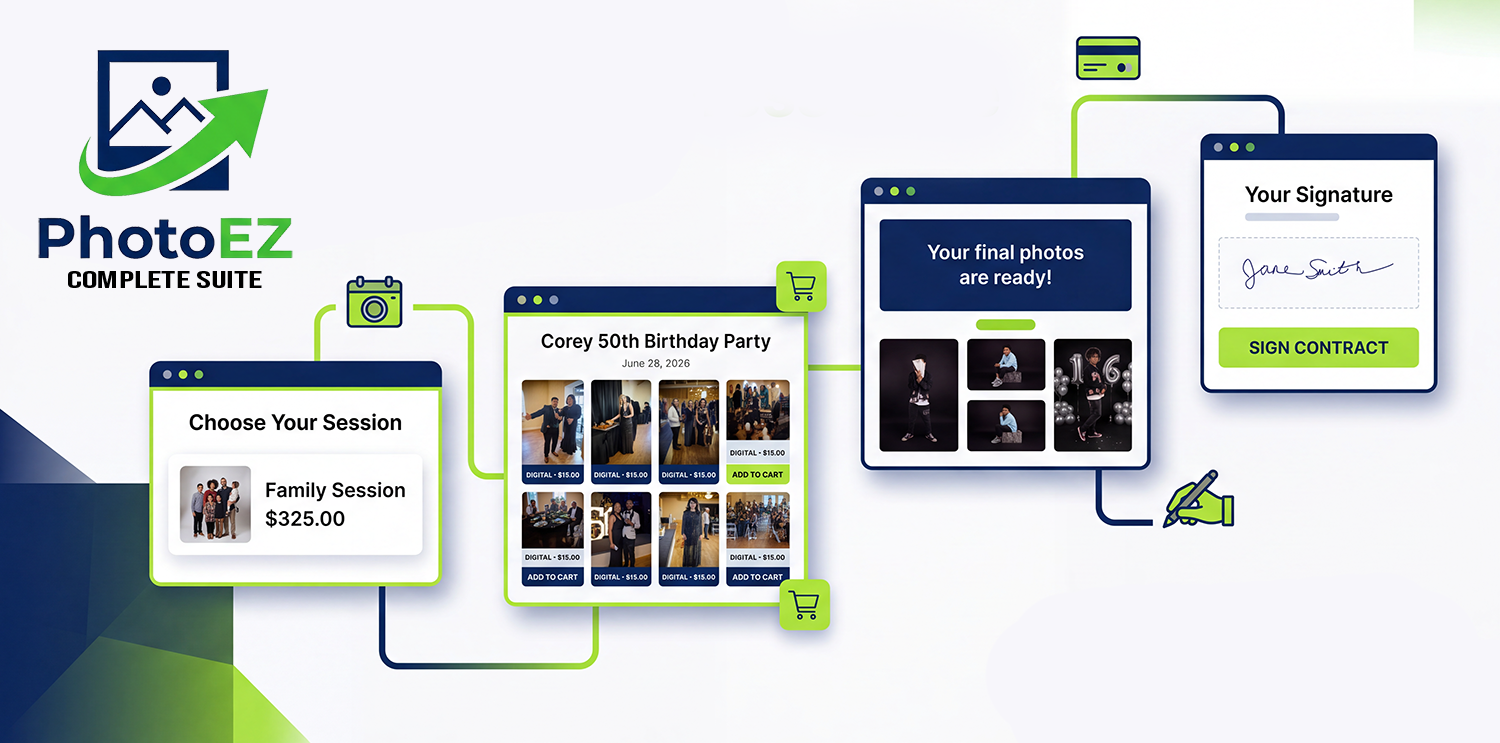
As a working photographer, I know the shape of that process better than any product manager would. A client books a session. They need to see the contract and sign it. A deposit comes in. The session happens. Then comes the part that can turn into a logistical mess — you’re editing hundreds of images, building proofs, watermarking, sending over a gallery, and waiting while the client picks favorites. Maybe they want extra images. Maybe prints. Maybe just the digital files. And then you still have to get everything to them securely, which usually means not emailing giant attachments or leaving full-resolution files sitting on a public URL.
Meanwhile, you’re also supposed to be running an actual business in between all of that.
I wanted software that respected all of it. Nothing did. So I built it.
The Workflow Comes First
The whole idea behind PhotoEZ can be summed up pretty simply: it’s a photographer’s workflow first, and software second. That’s why I built PhotoEZ around one continuous journey instead of five disconnected tools — the software should bend to fit how photographers actually work, not the other way around.
For most of us, that journey looks something like booking, then payment, then a contract, then the session itself, then proofing, selection, purchase, and delivery. Each step leads naturally into the next one. Clients don’t experience this as five separate pieces of software — nobody thinks “today I’ll deal with the booking system, tomorrow the contract portal, and next week I guess I’ll log into yet another site to see my photos.” They just think: I hired a photographer. The software should feel that simple too.
Why WordPress
I wanted PhotoEZ to live where most photographers already have their business set up — their own WordPress site.
Your website doesn’t have to be just a digital business card that sends people off to three other platforms. It can be the actual hub where clients book you, sign their contract, view their proofs, and download their final images — all without leaving your site, your branding, or your control. Your business stays yours, and your client data doesn’t end up scattered across somebody else’s servers.
No More Monthly Fees Just to Access Your Own Work
This one’s personal. Photographers already carry enough recurring costs — gear, lenses, computers, storage, insurance, editing software, hosting, marketing. I didn’t want to add “pay us monthly or lose access to your own client galleries” to that list.
I’d used tools like Pixieset and Pic-Time myself, and while they’re solid products, the subscription model started to wear on me the same way it does on a lot of photographers. PhotoEZ is built on a simple idea instead: you should own your platform, not rent your entire client experience from a SaaS company that can raise prices or shut down whenever it wants. You can see exactly what that looks like — one-time pricing, no recurring galleries tax — on the PhotoEZ pricing page.
Built From Real Problems, Not a Feature Checklist
The advantage of being both the developer and the photographer is that I’m not guessing at what photographers need — I’ve lived it. I’ve stood there wondering how I was going to organize 300 proofs. I’ve sent galleries to clients, dealt with them choosing images, handled add-on purchases, and figured out how to get high-resolution files delivered without a headache. A lot of those details never show up on a feature list, but they’re the stuff that actually makes your day easier or harder.
That’s where PhotoEZ’s features come from. Not “this sounds impressive,” but “I needed this and couldn’t find it.” Honestly, that’s the real answer whenever someone asks me why I built PhotoEZ instead of just buying another subscription.
One thing I cared about especially: the handoff between proofing and final delivery shouldn’t dump the client into a totally different system. They see watermarked proofs, they select what they want, they can add on extra images or products, and once it’s all settled, the high-res files go out securely — all in the same place. Less admin work for you, less confusion for them.
I’m a Photographer Who Became a Developer
People ask me why I built PhotoEZ pretty often, and the honest answer isn’t very glamorous. That’s really the core of it. I didn’t start as a software company that noticed photographers might need a plugin — I’m a photographer who got tired of the tools available and learned to build better ones.
That’s the lens everything goes through. When I add a feature, I think about how it actually fits into a real shoot-to-delivery workflow. When I touch a workflow, I think about how many clicks it takes when I’m sitting down exhausted after a full day of shooting. When I build something client-facing, I think about whether someone who isn’t tech-savvy at all can still figure it out without a tutorial. And before anything ships, I ask myself one question: would I actually use this in my own business? If the answer’s no, it doesn’t make the cut.
I’m not trying to build the biggest plugin out there — just one that photographers install and immediately recognize as their workflow, not a generic approximation of it.
PhotoEZ didn’t come out of a boardroom or a market analysis. It came out of me staring at a messy process, after 17 years behind the camera, and thinking there had to be a better way. That’s why I built PhotoEZ: a photographer’s workflow, built for photographers — and I’m still building it, because photography keeps changing, WordPress keeps evolving, and photographers keep finding new ways to create work worth showing off.
Your photography. Your website. Your clients. Your workflow.
You can try PhotoEZ Lite, the free version on WordPress.org.
You can see PhotoEZ in action, and the kind of work it was built around, over at Elle Jones Studios. For more posts like this one, visit the EJS Tech blog. Also, be sure to demo the plugins on the demo plage.
Elle Jones
EJS Tech